On-Device Tweak & .deb / .dylib Injection NEW v0.8.3
Directly inject Cydia / Sileo tweaks (.deb) and dynamic libraries (.dylib) into any IPA before signing. Native Mach-O load command patching with 64-bit arm64 and FAT binary support.
iOS 15 to iOS 18 · iPhone and iPad
ZeeSigner signs IPA files on the phone itself. It keeps more than three sideloaded apps on your Home Screen by swapping them in and out for you, and it can refresh over mobile data.
The companion app is only needed once, to pair your phone over USB. No developer account required.
Since ZeeImpactor is directly downloaded, macOS Gatekeeper may show “Apple could not verify...”. Follow these quick steps to open:
💡 Quick Option: In Finder, Right-click (or Control-click) ZeeImpactor.dmg ➔ Open ➔ Open. Or copy and paste in Terminal: xattr -cr ~/Downloads/ZeeImpactor*.dmg
Five built-in themes. You can also import your own.
Powerful features that make on-device iOS sideloading effortless and limitless.
Directly inject Cydia / Sileo tweaks (.deb) and dynamic libraries (.dylib) into any IPA before signing. Native Mach-O load command patching with 64-bit arm64 and FAT binary support.
Built-in visual interactive step-by-step pairing tutorial. Sideload ZeeSigner via ESign or Scarlet with a dev certificate, pair wirelessly using WireGuard / Local VPN, and never connect to a computer again.
Using a developer certificate? Sign and install unlimited apps simultaneously. Every app keeps its original unique Bundle ID and full entitlements without overwriting your existing apps.
Discover, download, and install top community tools directly on-device. Instant access to LiveContainer, EnsWilde, Dopamine, Delta, and Filza with instant offline catalog fallback.
A free Apple ID allows three active sideloaded apps. When you open a fourth, ZeeSigner deactivates the one you used least and activates the one you asked for. You can keep ten or more apps installed and only three are signed at a time.
An app that has been swapped out does not vanish. ZeeSigner leaves a Home Screen shortcut that uses the app's own high-resolution icon. Tap it and the app swaps back in.
Import an IPA from Safari, Files or cloud storage and sign it inside ZeeSigner. Once your phone has been paired, you do not need a computer to install or refresh.
Sign-in goes straight to Apple's own servers over TLS. ZeeSigner does not collect or store your Apple ID password, and the website never asks for it.
No home Wi-Fi, no cable, no VPN dropouts. Once the phone has been paired, the ZeeSigner Shortcut handles the network switch for you.
A free Apple ID gives you 7 days and 3 apps. A certificate registered to your device UDID gives you a full year with no app limit. Every certificate is issued by UDIDMaster and delivered by email as a .p12 and .mobileprovision pair.
Sign over 4G or 5G
Direct developer provisioning
Anti-revoke warranty
Full-year guarantee and push Most chosen
Two devices, dedicated line
About five minutes, once.
Get ZeeImpactor for your Mac (.dmg) or Windows PC (portable .zip) from the download list above.
Plug it in with a USB cable, tap Trust on the phone, then click Install in the companion app.
On the phone, open Settings, General, VPN & Device Management. Trust your developer profile, then open ZeeSigner.
Optional. Activate the Cellular Pass in ZeeSigner to unlock the Shortcut and refresh without Wi-Fi.
Walkthroughs on our YouTube channel.
If macOS blocks opening ZeeImpactor.dmg, follow these 4 quick steps:
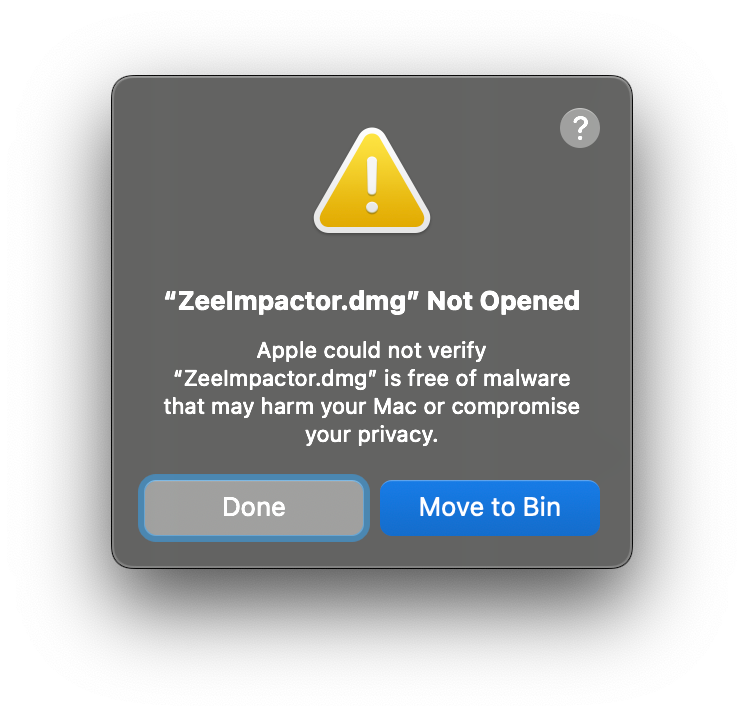
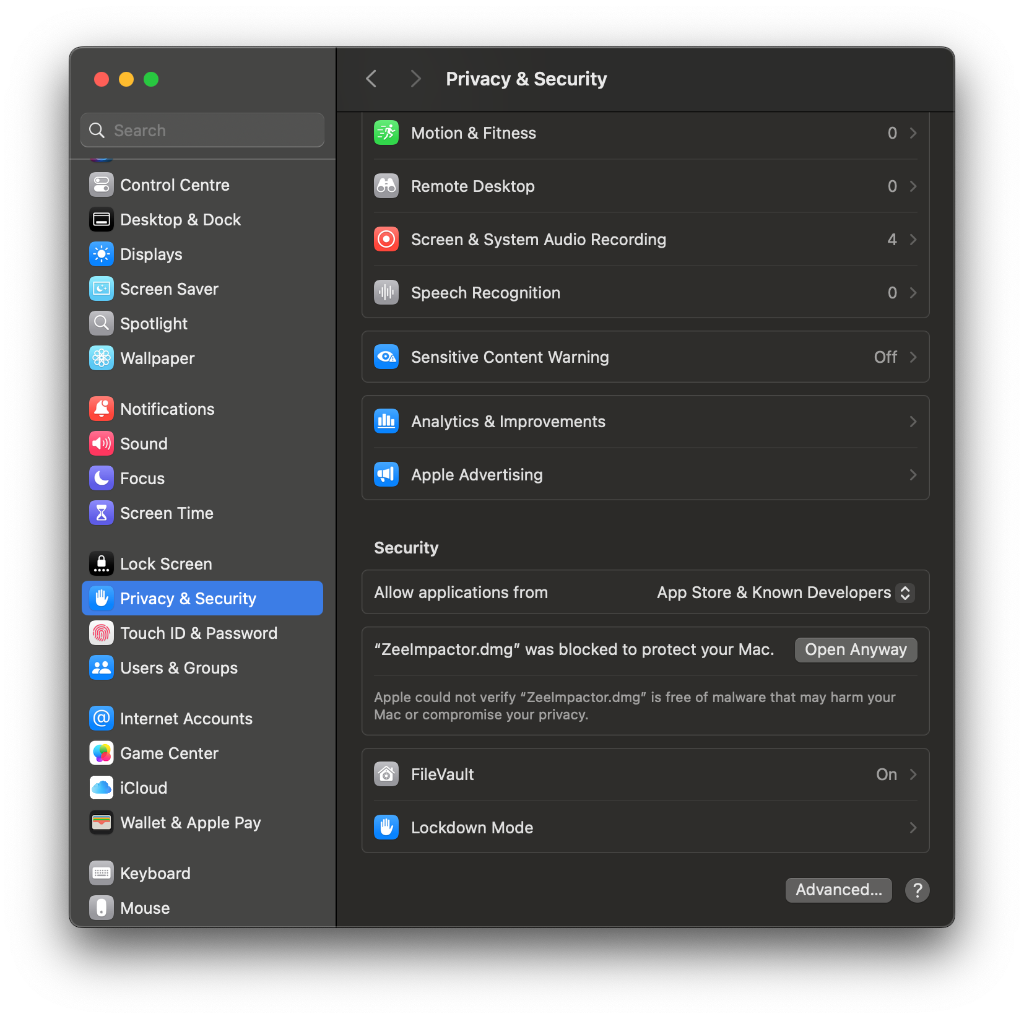
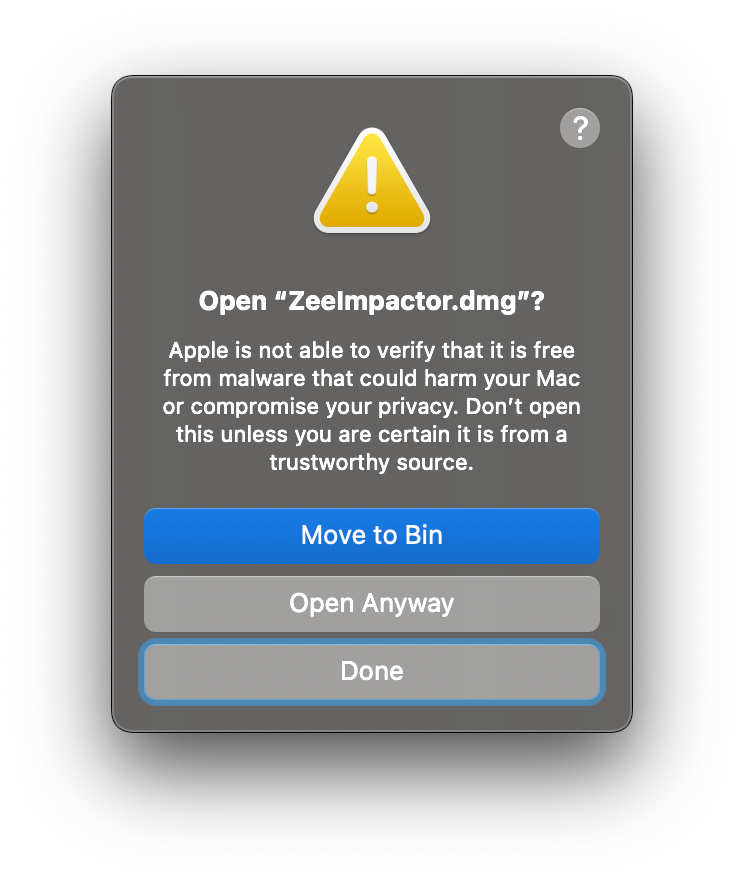
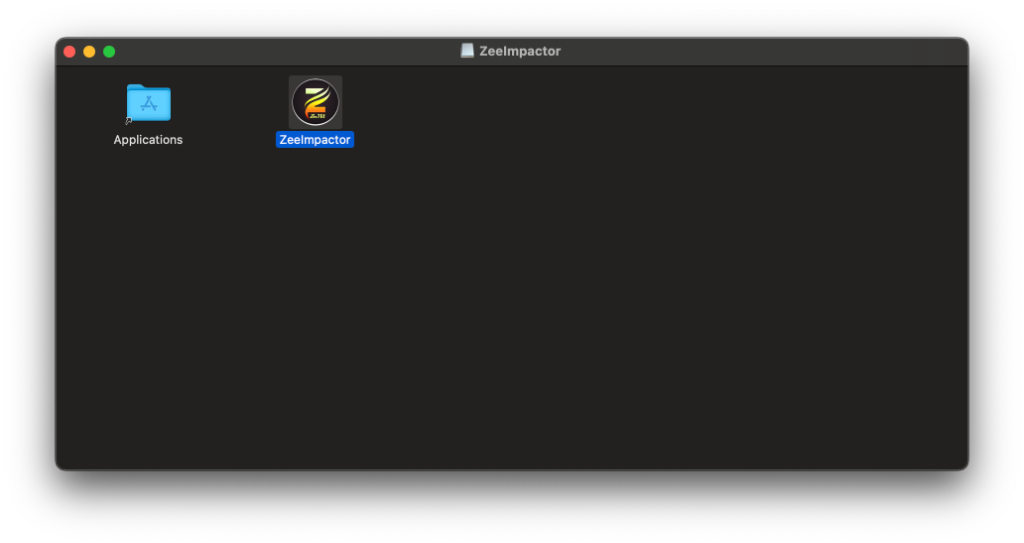
xattr -cr ~/Downloads/ZeeImpactor*.dmg
Not here? Use the chat button, or message us on Telegram.
Yes. After a one-time USB pairing with a Mac or Windows PC, ZeeSigner stores the pairing on the phone. With the ZeeSigner Shortcut you can sign and refresh apps over 4G or 5G, away from home and away from your computer.
The app is free to use with a normal free Apple ID, including the Auto-Swapper and Home Screen shortcuts. Certificates and the Cellular Pass are optional upgrades for people who want 365-day validity or mobile data signing.
Apple allows 3 active sideloaded apps on a free Apple ID. When you open a fourth, ZeeSigner deactivates the app you used least, leaves a Home Screen shortcut with its real icon, and activates the one you want. Tapping that shortcut later swaps it back.
No. After the first pairing, signing happens on the phone. Free accounts refresh over Wi-Fi, or over mobile data with the Cellular Pass. If you have a certificate from our store, you do not need a PC or a VPN at all.
Installing apps on your own iPhone or iPad for development, testing and private use is permitted in many regions, and in the EU the Digital Markets Act has opened up alternative installation. Rules differ by country, so check the law where you live. ZeeSigner is an independent tool and is not affiliated with Apple.
No. Sign-in is handled by Apple's servers inside the app. Our website, our chat and our support team will never ask you for your Apple ID password.
macOS Gatekeeper blocks directly downloaded apps by default. Follow these 4 quick steps to authorize and open it in 5 seconds: