Sign & Install iOS Apps.
Directly on Your iPhone.
The ultimate on-device IPA sideloading tool for iOS 15 through iOS 27.2+ & upcoming betas. Rotate unlimited apps, sign with your Dev Cert or Apple ID, and refresh over mobile data without a computer.
Desktop Companion
Plug in once over USB to pair wirelessly using your free Apple ID. Permanent zero-revoke signing · no computer needed after setup.
1-Tap Safari Install (No PC)
Pre-loaded with official latest ZeeSigner v0.8.9.55. Sign and install in seconds on-device with zero computer needed.
Requires Anti-Revoke DNS profile to bypass Apple's blacklist. (If this is blocked on your iOS version, use the Online Web Signer above).
Everything You Need for Unlimited iOS Sideloading
Engineered from the ground up for maximum reliability, speed, and privacy on iOS 15 through iOS 27.2+ & Upcoming Betas.
Smart Slot Auto-Swapper
Apple limits free Apple IDs to 3 active apps. When you open a 4th, ZeeSigner automatically deactivates the least recently used app and leaves a Home Screen shortcut with its real icon. Tapping it swaps it back instantly.
Direct .deb & .dylib Tweak Injection
Inject Cydia and Sileo tweaks (.deb) or dynamic libraries (.dylib) directly into any IPA file on-device before signing. Native Mach-O load command patching with full 64-bit arm64 and FAT binary support.
Cellular Mobile Data Refresh
No home Wi-Fi or computer required when away. Using the ZeeSigner Cellular Shortcut, your phone switches routes automatically and refreshes your certificates over 4G or 5G in about a minute.
Lightning In-Memory Signer
Built with an ultra-optimized in-memory codesign engine with zero Cydia Substrate crash dependencies. Signs large 1GB+ games and apps in under 15 seconds without freezing or battery drain.
Your Apple ID Stays with Apple
Sign-in communicates directly with Apple's authentication servers over encrypted TLS. ZeeSigner does not collect, forward, or store your Apple ID password on any remote server.
Standalone Multi-App Signing
Using an enterprise or developer certificate? Sign and install unlimited apps simultaneously. Each app preserves its original unique bundle identifier, extensions, and push notification entitlements.
Popular Community Apps Ready to Install
Download top open-source iOS applications directly, or import any custom IPA file from Safari or Files.
Delta Emulator
All-in-one retro console emulator for iOS. Play Game Boy, GBA, Nintendo DS, NES, SNES, and N64 with controller support.
Download Delta IPA ↓LiveContainer
Run unlimited iOS apps inside a single App ID slot. Bypasses the 3-app sideloading limit without multiple registrations.
Download LiveContainer IPA ↓EnsWilde
Standalone on-device utility to customize iOS system settings, SpringBoard preferences, and tweaks without jailbreak.
Download EnsWilde IPA ↓Dopamine
Modern rootless jailbreak for arm64 and arm64e devices running iOS 15.0 through 16.6.5 with ElleKit support.
Download Dopamine IPA ↓Filza File Manager
Powerful file management utility for iOS devices. Inspect app containers, edit plists, extract archives, and manage documents.
Explore Filza →Import Your Own IPA
Downloaded an IPA from GitHub or Safari? Tap "Share → Open in ZeeSigner" to sign and install it directly on your iPhone.
Install ZeeSigner First ↑How to Install ZeeSigner
Choose the method that works best for your device. Takes less than 3 minutes.
Install Anti-Revoke DNS
Tap Step 1: Get Anti-Revoke DNS Profile above. Then go to Settings → Profile Downloaded → Install and make sure it is selected under Settings → General → VPN & Device Management → DNS.
Install & Trust ZeeSigner
Tap Step 2: Install ZeeSigner (1-Tap Safari). Once installed on your Home Screen, go to Settings → General → VPN & Device Management, tap HSBC Bank plc, and tap Trust.
On-Device Pair (No PC • iOS 17–27)
Open ZeeSigner, tap Create on This Device (No PC), and approve the pairing popup in iOS Settings → Privacy & Security → Developer Mode.
Sign Any App with Free Apple ID
Sign in with your personal Free Apple ID (or 365-Day Dev Cert) inside ZeeSigner to sign, clone, inject tweaks, and refresh any IPA 100% on-device!
Download ZeeImpactor DMG
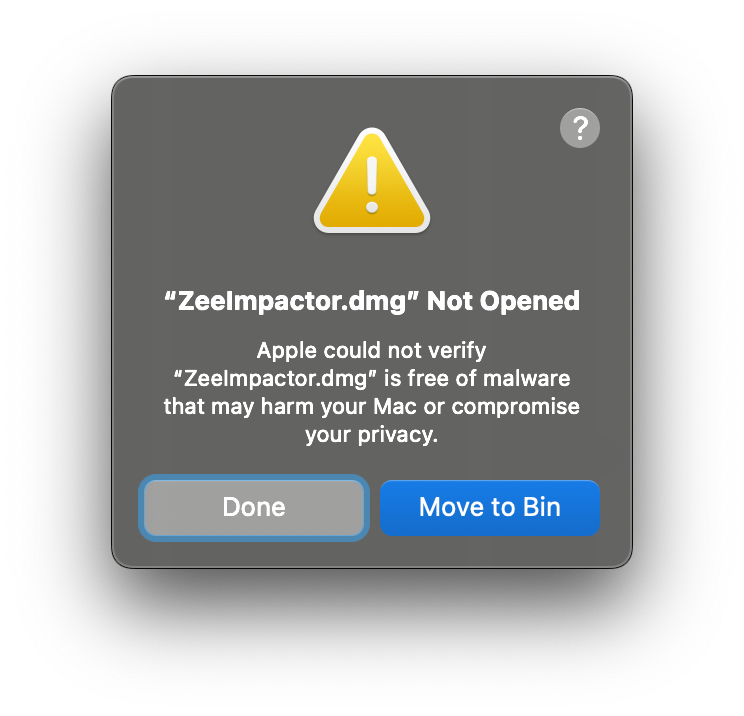
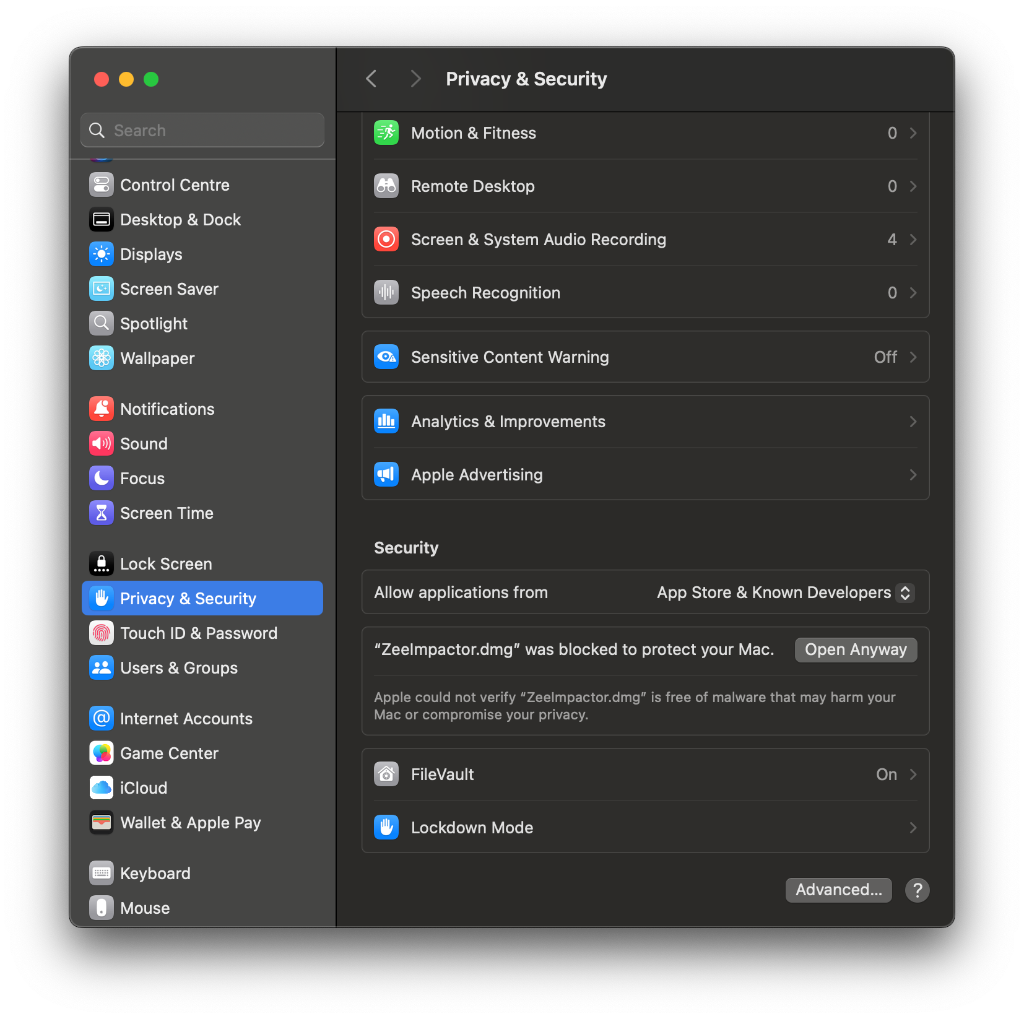
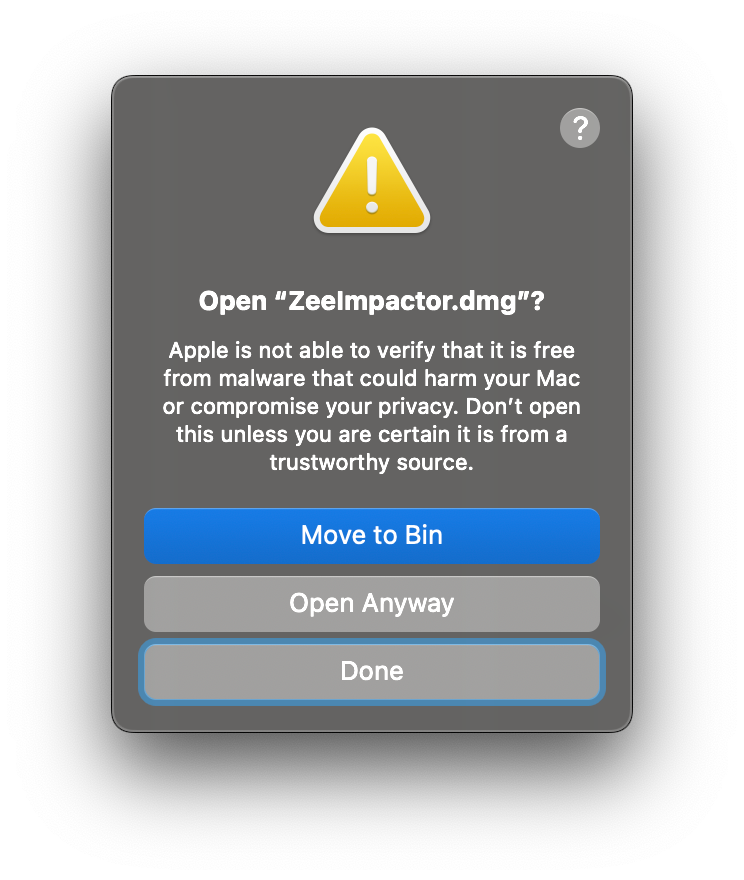
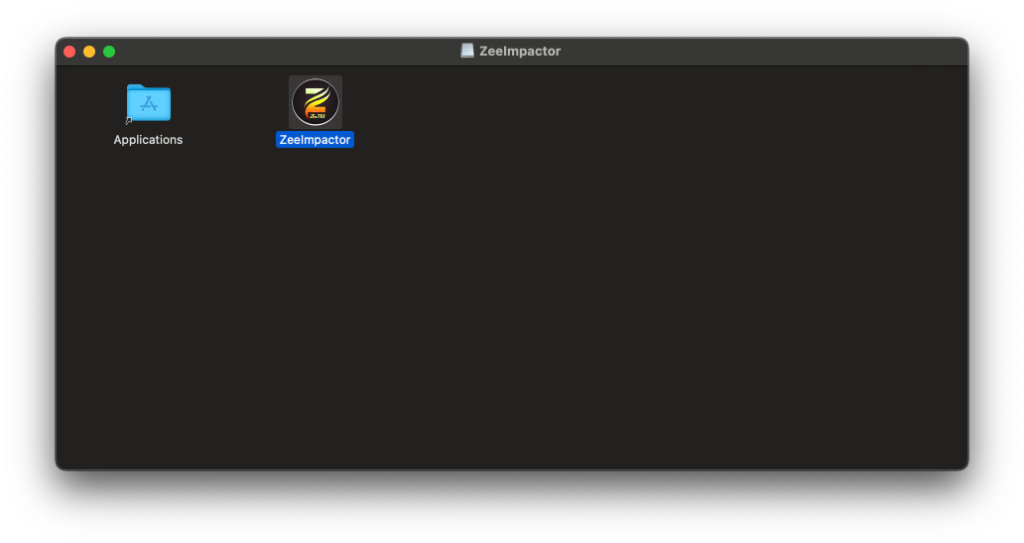
Download ZeeImpactor.dmg on your Mac. Drag ZeeImpactor into your Applications folder. If Gatekeeper prompts, click Open Anyway.
Connect iPhone via USB
Plug your iPhone or iPad into your Mac with a USB cable. Tap Trust This Computer on the iPhone and enter your passcode.
Click "Install ZeeSigner"
Open ZeeImpactor, enter your personal Apple ID (handled directly via Apple TLS), and click Install ZeeSigner.
Unplug & Enjoy Wireless
Once installed, trust the developer profile in Settings. Unplug your iPhone! Signing and refreshes now happen wirelessly on-device.
Download Windows ZIP
Download ZeeImpactor-Windows-Portable.zip and extract it into a folder. Ensure iTunes and iCloud (non-Microsoft Store) are installed.
Connect iPhone
Plug your device into your PC with a USB cable and tap Trust on your iPhone screen.
Install to Device
Run ZeeImpactor.exe, enter your Apple ID credentials, and click Install to install ZeeSigner on your iPhone.
Enable Developer Mode
On iOS 16, 17, and 18, go to Settings → Privacy & Security → Developer Mode and switch it ON. You're completely set!
Install ZeeSigner Shortcut
Open ZeeSigner on your phone, navigate to Settings, and tap Install Cellular Shortcut to add it to your Apple Shortcuts app.
Disconnect Home Wi-Fi
Turn off Wi-Fi in iOS Control Center. Switch to 4G or 5G mobile data.
Tap "Refresh All Apps"
Inside ZeeSigner, tap Refresh. The automated shortcut executes locally and resets the tunnel in about 45 seconds.
7 Days Renewed Everywhere
Your apps refresh successfully without touching a PC or connecting to home Wi-Fi ever again!
New to Sideloading? Take the A-Z Academy Course!
A complete Udemy-style 8-stage interactive guide for absolute beginners: learn how signing works, install without PC, re-use 10 App ID slots, and sign offline with zero data consumption.
365-Day Certificates & Cellular Passes
Free Apple IDs give you 7 days. If you prefer 365-day signing without revokes, get a dedicated UDID certificate from our partner UDIDMaster.
Pro Pass
Filza, Tweak Vault & 4G/5G Cellular
- ZeeFileManager (Filza Browser)
- 5 Injected .dylib Tweaks (Mod IPAs)
- Refresh apps on 4G/5G mobile data
- Standalone Home Screen App Icons
- Instant device activation
Standard
Direct developer provisioning
- 365 days of app signing
- Unlimited sideloaded apps
- No 7-day refresh cycles
- Delivered via .p12 & profile
Premium
Full 365-day revoke warranty
- 365-day revoke warranty
- Instant automatic replacement
- Push notifications enabled
- CarPlay & custom VPN entitlements
- Priority 24/7 VIP support
VIP Plan
Two devices & instant activation
- 1-second instant activation
- 2 devices (iPhone + iPad)
- Lifetime revoke protection
- Private VIP WhatsApp line
Frequently Asked Questions
Everything you need to know about certificates, slot rotation, and device security.
Can ZeeSigner sign apps over mobile data?
Is ZeeSigner completely free?
How does the Auto-Swapper bypass the 3-app limit?
Do I need to keep my phone connected to a PC?
Do you ever collect or store my Apple ID password?
Is sideloading apps on iOS legal?
Version History & Improvements
See how ZeeSigner evolves every week with powerful on-device features, exclusive tweaks, and performance fixes.
- Smart Dev Cert In-Place Self-Updates: Developer Certificate users can sign and install ZeeSigner updates directly in-place with their own cert, use 1-Tap Safari OTA, or skip a version anytime.
- ZeeSigner Version History: Switch between v0.9.1.24, v0.9.1.20, or Classic v0.8.9.38 directly inside the app or via the upgraded Online Web Signer.
- ZeeCloud Pairing Vault v2: SHA256 cryptographic key sync, automatic backup notifications, manual Sync Now button, and instant PairVerifyFailed detection.
- Full iOS 15 – iOS 27.2+ & Beta Support: Verified on iOS 27.0.1, iOS 27.2, and upcoming developer betas with guided Apple ID & Zero-PC wireless pairing setup.
- Cold-Launch IPA Import & CoreData Stability: Reliable Share / "Open With" .ipa imports and crash-free startup persistence.
- 100% Emoji-Free Apple Native UI: Replaced all legacy emojis across the entire app with crisp, pixel-perfect Apple SF Symbols and responsive vector iconography for a streamlined professional experience.
- Multi-Apple ID Vault & 3-App Limit Bypass: Connect up to 5 Apple IDs simultaneously. Sign 3 apps per Apple ID to run up to 15 sideloaded apps on a single device without a computer or paid account.
- Provisioning Profile Matching & Auto Recovery: Robust handling for Error 0xe8008015 with seamless fallback to 1-Tap Safari OTA installation when switching developer profiles.
- Optimized High-Speed Signing Engine: Sub-2-second signing pipeline with pre-cached payloads and automatic developer slot de-duplication.
- Isolated Multi-Session Keychain Sandbox: Enhanced session isolation preventing credentials and developer team conflicts.
- Multi-Apple ID Vault & 3-App Limit Bypass: Connect up to 5 Apple IDs simultaneously! Sign 3 apps per Apple ID to run up to 15 sideloaded apps on a single device completely free without a PC or paid developer account.
- Auto App Swapper & Intelligent Slot Management: Seamlessly deactivate and reactivate sideloaded apps on the fly. Free up slots instantly to launch deactivated apps directly from home screen widgets without losing data.
- 10 App ID 7-Day Limit Quota Re-Use: Re-use active registered App IDs across modded IPAs to bypass Apple's strict 10-bundle-ID 7-day limit (Error 9120) with zero waiting.
- Isolated Multi-Apple ID Sessions & Complete Sign Out: Each Apple ID operates in an isolated Keychain sandbox. Added individual red trash can account deletion and an interactive "Sign Out of ALL Apple IDs" action sheet.
- Automatic Developer Team ID Recovery (-1 / 3170 Fixed): Implemented
executeWithAutoTeamRecoveryinside DeveloperPortalProxy to silently resolve team mismatches and prevent signing failures. - Prominent In-App 1-Tap Self-Update: Upgrade ZeeSigner directly on-device with zero computer dependency, even when public enterprise certificates are revoked.
- Redesigned Frosted Glass Bottom Navigation Bar: Re-engineered with Apple
UIBlurEffect(style: .systemUltraThinMaterial), Electric Orange active accent tinting, and modern SF Symbols (newspaper.fill,antenna.radiowaves...,safari.fill,square.grid.2x2.fill,gearshape.fill). - iOS 15 Core Data Crash Fix: Completely eliminated
NSInternalInconsistencyException("NSPersistentStoreCoordinator has no persistent stores") during background log purges. - High-Speed Online Web Signer (/sign/): Instant-rendering animated modal with IndexedDB local binary pre-caching and 1-Tap Apple Safari OTA Intent.
- Zero-Fee Crypto Payment Gateway (/buy/): Automated Bitcoin Lightning & Binance Pay via CoinOS, multi-chain USDT transfers, and strict UDID validation.
- Neon Milestone Expiry Timeline Card: Completely redesigned the certificate expiration timeline with an ultra-sleek dark neon glassmorphism stepper card (<1d, 1d, 2d, 3d, 4d, 5d, 6d+), glowing progress capsules, and verified shield badges.
- 4 New Category 1 Universal In-App Tweaks (10 Vaulted Tweaks Total): ZeeAppLock, ZeeSpeedHack, ZeeTrueDark, and ZeeBypass.
- AES-256-GCM Military Grade Vault Encryption: All 10 built-in tweaks are packaged inside the encrypted binary vault, guaranteeing zero file corruption and zero unauthorized tampering.
- TweakHub Dynamic Remote Tweaks: Community tweaks can now be hosted and imported dynamically without ever having to rebuild the ZeeSigner application!
- Full Community Repositories & Sources Hub: Add any third-party AltStore or CyPwn JSON repository URL (e.g.
https://ipa.cypwn.xyz/cypwn.json). Browse thousands of apps, tweak packages, and themes natively. - 1-Tap "GET" & Auto-Launch Signing Sheet: Downloading any IPA from Community Sources automatically transitions cleanly into the ZeeCustomizeAppSheet modal ready to tweak and sign.
- Dynamic Island Emergency Cancel Button: Added instant abort buttons to both the floating Dynamic Island status pill and the in-app progress card. Never get stuck on hung downloads or installs!
- Refresh All 10 App ID Limit (9120) Fix: Refresh All authoritatively preserves and reuses already registered Apple Developer Portal App IDs, completely eliminating the free account 10 App ID limit error.
- iOS 26.4+ WireGuard Loopback Fix: Removed artificial IPSec restrictions in the minimuxer engine, ensuring LocalDevVPN connects seamlessly on the latest iOS versions.
- Universal Dynamic Island In-App Banners: Morphing spring capsule with material blur and swipe-to-dismiss. Works across all iOS devices (iPhone 11 through 17 & iPads).
- 6th Exclusive Built-in Tweak (
ZeeDynamicIsland.dylib): Pre-encrypted in the AES-256 Vault for 1-tap injection into any signed app. - Refined Vector UI: Clean Apple SF Symbols and Bootstrap Icons across the entire interface, removing raw emoji artifacts.
- Dual Checkout Integration: Primary instant FixMySERP GlobalPayments + Alternative PayPal routing.
- FixMySERP GlobalPayments Checkout: Primary online checkout for Apple Developer Certificates ($18–$65) & Cellular Pass ($8).
- Frosted Glass Center Update Modal: Seamless 1-tap on-device self-updating.
- Darwin XNU Kernel Terminal: 100% Free for all devices (
rootctl:/#command prompt). - High-Priority Anisette Pool: Fallback pool resolving Apple ID error -80045.
- Clean Window Transitions: Eliminated UIKit presentation collisions on app startup.
- MobileGoose Engine: 100% touch-through desktop pet & floating Picture-in-Picture (PiP) strip.
- ZeeFileManager: Filza-style Root and Sandbox file browser with hex viewer and IPA extractor.
- AES-256-GCM Tweak Vault: Cryptographically protects built-in tweaks with AAD authentication.
- Pro Security & Cellular Pass ($8): Permanent 4G/5G signing without PC or Wi-Fi.
- WireGuard Tunnel Auto-Pairing: Completely wire-free on-device app refreshing.
- Apple Developer P12 Certificate Management: With anti-revoke warranty.
- Live IPA Library: With search, source repos, and 1-tap installations.