A native iOS application designed for TrollStore environments to dump Objective-C headers, Swift type information, symbols, and structural details from Mach-O binaries directly on-device. Inspired by class-dump, but built entirely in Swift for iOS.
Overview
MachOHeaderDumper provides developers, security researchers, and tweak developers with a powerful on-device tool to inspect iOS applications, frameworks, and dynamic libraries. By leveraging TrollStore's ability to bypass standard sandbox restrictions, this app performs deep static analysis of Mach-O files without requiring a jailbreak or desktop tools for basic header dumping and structural analysis.
Core Capabilities:
Objective-C Header Dumping: Extracts @interface, @protocol, @property, and @method declarations similar to class-dump.
Swift Type Extraction: Identifies Swift classes, structs, enums, and protocols present in the binary metadata. Attempts symbol demangling using dlsym.
Handles categories and merges them into base class definitions.
Identifies class (+) and instance (-) methods and properties.
Detects instancetype based on common patterns.
? Swift Analysis (Basic):
Parses __swift5_types section to find type context descriptors.
Extracts mangled names for Classes, Structs, and Enums.
Attempts demangling using _swift_demangle via dlsym (requires the function to be available in loaded images or the target binary).
? Dynamic Linker Info:
Parses and displays rebase operations (pointer fixups).
Parses and displays bind, weak bind, and lazy bind operations (symbol linking).
Parses and displays the export trie information.
? Symbol Table Viewer: Lists symbols with their type, scope (external/local), section, and address/value.
? Export Options:
Copy generated Objective-C headers to the clipboard.
(Future) Share headers as .h files.
(Future) Export parsed structural info (JSON?).
? File Handling:
Import binaries using UIDocumentPickerViewController.
Automatically resolves executables within .app and .framework bundles.
Technical Details
Language: Primarily Swift, leveraging low-level access via mmap, UnsafeRawBufferPointer, and direct struct memory binding.
Concurrency: Uses async/await and Task.detached for background parsing to keep the UI responsive. Actor isolation (MainActor) is used for UI updates.
Parsing: Implements manual parsing of Mach-O structures, Objective-C metadata (class_ro_t, method_t, etc.), Swift type descriptors, and dyld opcodes (ULEB128/SLEB128 decoding, state machines). Avoids external parsing libraries for core Mach-O structure.
Demangling: Relies on runtime availability of _swift_demangle via dlopen/dlsym. Does not bundle a static demangler library.
TrollStore: Requires TrollStore installation to grant the app the necessary permissions to:
Read files outside its sandbox (e.g., system frameworks, other app bundles).
Potentially use dlopen on arbitrary binaries (used for demangling).
Installation (Requires TrollStore)
Download the latest .tipa file from the Releases page.
Open the downloaded .tipa file with TrollStore.
Tap "Install".
The MachOHeaderDumper app will appear on your Home Screen.
Usage
Launch the MachOHeaderDumper app.
Tap the "Import File..." button.
Use the Files browser to navigate to and select the desired .dylib, .framework, or .app file/bundle.
The app will parse the binary in the background. Status updates will be shown.
Once parsing and analysis are complete, use the segmented picker at the top to switch between different views:
ObjC Header: View the generated Objective-C headers (if any). Use the "Show IVars" toggle if desired.
Swift Types: View basic information about detected Swift types (mangled/demangled name, kind).
Info: View Mach-O header details and UUID.
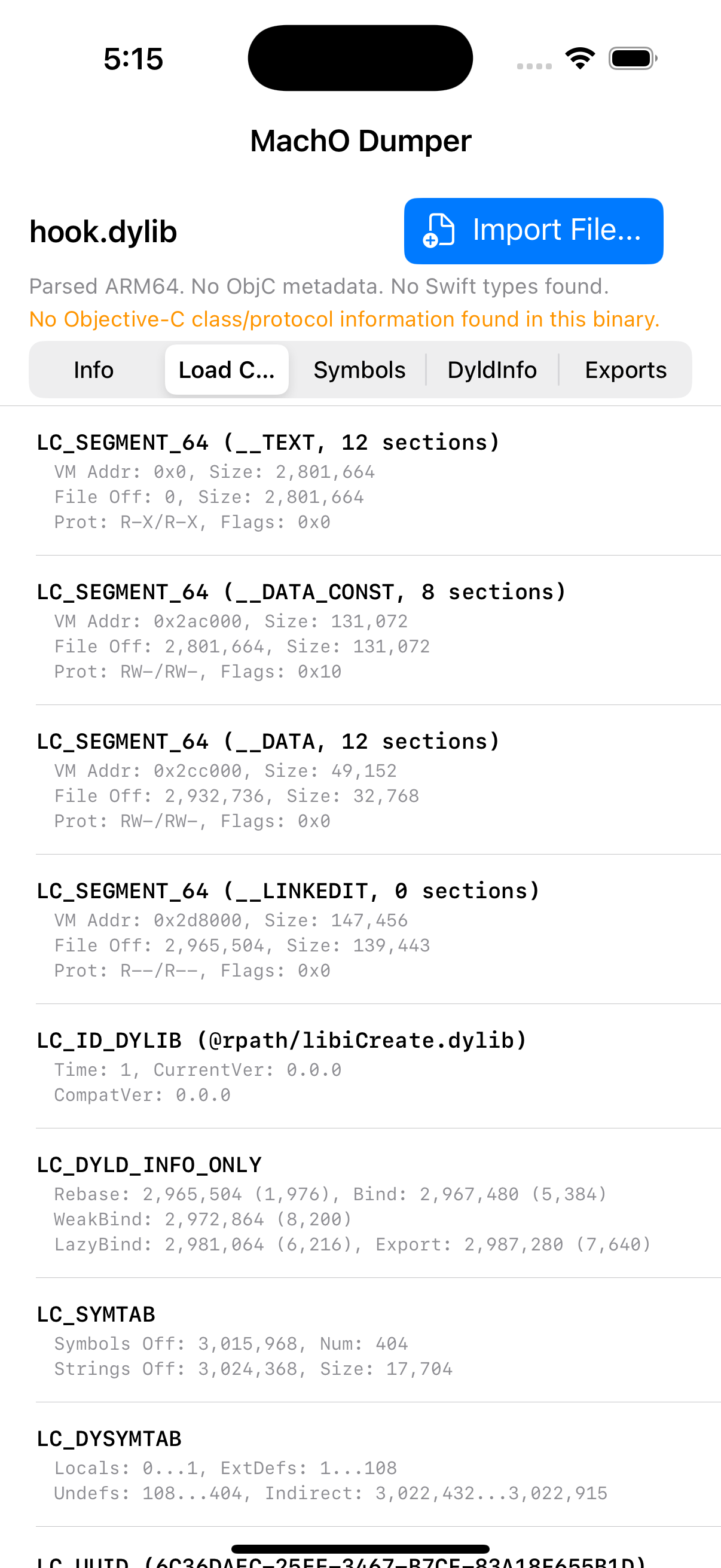
Load Cmds: View the list of load commands and their parameters.
Symbols: Browse the symbol table.
DyldInfo: View rebase and bind operations.
Exports: View exported symbols.
Text selection is enabled in most detail views.
Limitations & Future Work
Swift Analysis: Swift metadata parsing is basic. It doesn't yet extract methods, properties, protocol conformances, or detailed enum cases/struct layouts. Generating full Swift interface files is a future goal.
Demangling Reliability: Swift demangling depends on finding _swift_demangle at runtime, which may not always succeed. Bundling a static demangler is a potential improvement.
Objective-C Accuracy: Assumes relatively modern Objective-C runtime structures. Parsing highly obfuscated or unusual binaries might yield incomplete results. Doesn't handle runtime-only features like associated objects.
Encrypted Binaries: Cannot currently parse encrypted App Store binaries. On-device decryption is a complex future possibility.
Error Handling: While basic error handling is present, parsing malformed binaries could still lead to unexpected behavior or crashes.
UI/UX: Further refinements like cross-referencing, search/filtering, graphical visualizers, and improved export options are planned.
Runtime Analysis: Adding modes for inspecting live processes or loaded libraries is a potential advanced feature.
Building from Source
Clone the repository: git clone https://github.com/speedyfriend433/MachOHeaderDumper.git
Open MachOHeaderDumper.xcodeproj in Xcode.
Select your device or simulator. (Note: dlopen/dlsym behavior might differ on simulator vs. device).
Build the project (Cmd+B).
To install on a device via TrollStore, you'll need to export an unsigned IPA:
Product -> Archive.
In the Organizer window, select the archive.
Click "Distribute App".
Choose "Ad Hoc" or "Development".
Under "App Thinning", select "None".
Crucially, uncheck "Include manifest for over-the-air installation" and ensure code signing is set to "Sign to Run Locally" or manually configured for no signing. (The exact steps depend on Xcode version and project setup. The goal is an unsigned IPA).
Export the IPA file.
Transfer the IPA to your device and install with TrollStore.
MachOHeaderDumper for iOS (TrollStore) iPA Installation Guide
How to Install MachOHeaderDumper for iOS (TrollStore) IPA File?
This IPA file can be installed on your iPhone/iPad in a number of ways. Here are some of the easiest, most popular, and secure methods. It's recommended to use TrollStore to avoid the 7-day app revocation.
Install via TrollStore
TrollStore is a jailed, permasigned app that supports iOS 14.0, 15.0-16.5, and iOS 17.0 and can install any IPA installer permanently. It works by using AMFI/CoreTrust to ensure that the root certificate used to sign the app has not been revoked.
It is a third-party app store for iOS devices that allows users to download and install apps, games, and other software not available in the official app store. To install an IPA file using TrollStore, you can follow these steps:
Download the TrollStore app from ZEEJB Installer Store.









iPA Library Revolution