Top Fake GPS Tweaks for Your Device
Top Fake GPS tweaks: In the world of jailbreaking, these tools have become essential for users looking to spoof their location. With various options available, it can be challenging to determine which tweak is the best fit for your needs.
Best Fake GPS Tweaks Reviewed
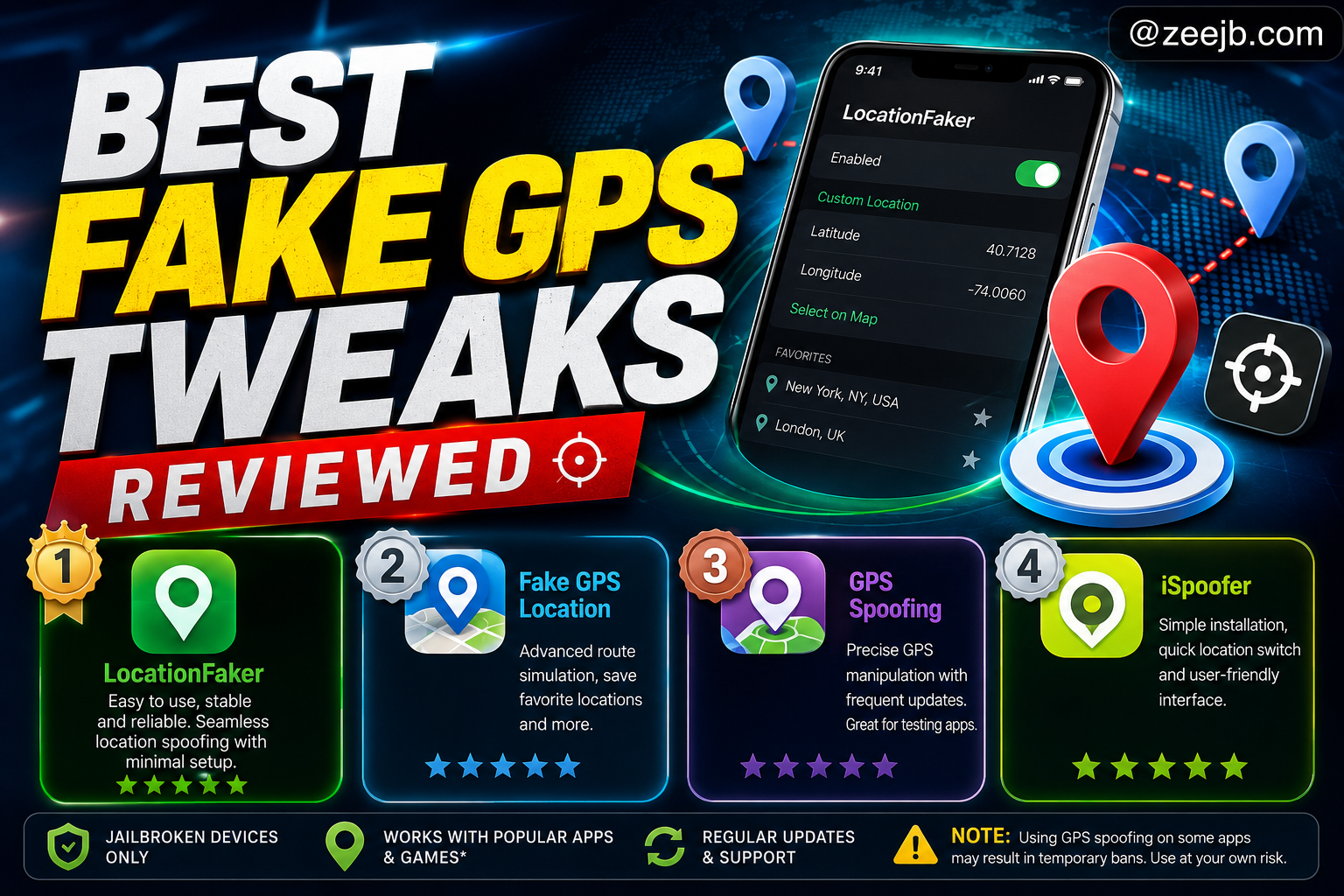
There are several Fake GPS tweaks available in the jailbreak community; here we list their effectiveness and user satisfaction. The top place is taken by LocationFaker, a user-friendly tweak that allows seamless location spoofing with minimal setup. Users appreciate LocationFaker for its straightforward interface and the ability to easily set custom locations.
The second place is taken by Fake GPS Location, which offers advanced features such as route simulation and the ability to save favorite locations.
GPS Spoofing is another popular option, known for its functionality and frequent updates. This allows users to manipulate their GPS coordinates with precision, making it a favorite among developers for testing apps. Community feedback highlights its effectiveness, though some users may encounter app compatibility issues, especially with certain games.
Lastly, iSpoofer remains a strong choice; users commented on its straightforward installation process, ability to switch locations quickly, and user-friendly interface. However, some users have experienced temporary bans on certain apps, so caution is advised.
Overall, these tweaks cater to different user needs, and community feedback suggests that LocationFaker and Fake GPS Location are particularly favored for their balance of features and reliability.
How to Install Fake GPS Tweaks
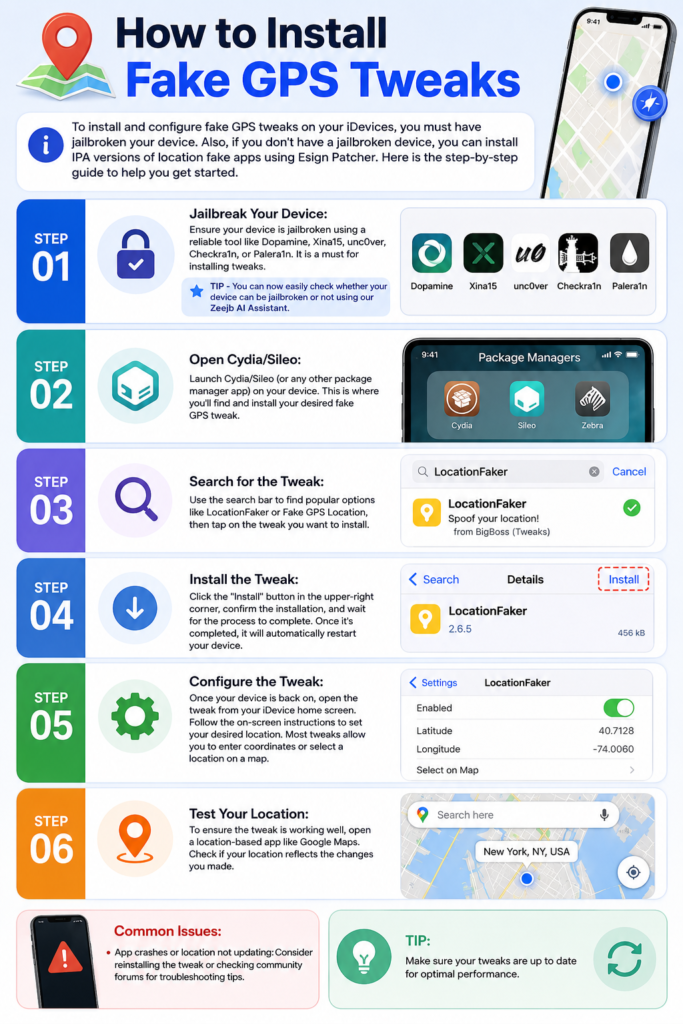
To install and configure fake GPS tweaks on your iDevices, you must have jailbroken your device. Also, if you don’t have a jailbroken device, you can install IPA versions of location fake apps using Esign Patcher. Here is the step-by-step guide to help you get started.
Step 01: Jailbreak Your Device: Ensure your device is jailbroken using a reliable tool like Dopamine, Xina15, unc0ver, Checkra1n, or Palera1n. It is a must for installing tweaks.
TIP - You can now easily check whether your device can be jailbroken or not using our Zeejb AI Assistant.
Step 02: Open Cydia/Sileo: Launch Cydia/Sileo (or any other package manager app) on your device. This is where you’ll find and install your desired fake GPS tweak.
Step 03: Search for the Tweak: Use the search bar to find popular options like LocationFaker or Fake GPS Location, then tap on the tweak you want to install.
Step 04: Install the Tweak: Click the “Install” button in the upper-right corner, confirm the installation, and wait for the process to complete. Once it’s completed, it will automatically restart your device.
Step 05: Configure the Tweak: Once your device is back on, open the tweak from your iDevice home screen. Follow the on-screen instructions to set your desired location. Most tweaks allow you to enter coordinates or select a location on a map.
Step 06: Test Your Location: To ensure the tweak is working well, open a location-based app like Google Maps. Check if your location reflects the changes you made.
Common Issues:
– App crashes or location not updating: Consider reinstalling the tweak or checking community forums for troubleshooting tips.
TIP: Make sure your tweaks are up to date for optimal performance.
Common Issues with Fake GPS Tweaks
When using this Fake GPS tweak on jailbroken devices, users may encounter several common issues that can degrade the user experience. Understanding these problems enhances your location spoofing experience.
Issue: Tweak not functioning as expected.
This may happen if the tweak is not compatible with your iDevice version. Always check for updates, as the developer frequently releases patches to improve the app’s functionality and address bugs.
Issue: The GPS signal is not updating or is inaccurate.
To fix this issue, make sure you have granted the necessary permissions for the tweak to access location services. Additionally, try restarting the device and reinstalling the tweak.
Issue: Apps not recognizing the spoofed location.
In such cases, consider enabling the “mock location” feature if the tweak offers that feature.
Issue: App crash or performance issues.
To fix this issue, try disabling other tweaks temporarily and see if the problem persists. Try engaging with the community forums.
What the Community Is Saying
The community is buzzing with recommendations for various fake GPS tweaks, highlighting their features, ease of use, and compatibility with different apps. Users share their personal experiences, praising tweaks like ‘Fake GPS Location’ for its reliability and ‘LocationFaker’ for its user-friendly interface.
Discussion source: What’s The Best Fake GPS Tweak?
FAQ
Compatibility with apps: Most popular apps work seamlessly with the Fake GPS tweaks; some may detect spoofing and restrict access. So you should be aware that certain games, apps, or location-based services may flag unusual activity, leading to temporary bans or restrictions.
Battery drain or app crashes: community members recommend keeping your tweaks up to date to minimize these issues.
Best Fake GPS Tweaks for Jailbroken Devices
When it comes to spoofing your location on jailbroken devices, several fake GPS tweaks stand out. Below is a review of the top options available, including installation instructions, common issues, and community feedback.
1. **LocationFaker**
– Installation: Available through Cydia. Search for “LocationFaker” and tap “Install.”
– Common Issues: Users report occasional crashes with certain apps.
– Community Feedback: Generally positive, with many praising its ease of use.
2. **Fake GPS Location**
– Installation: Download from Cydia. Follow the prompts to install.
– Common Issues: Some users experience GPS signal loss after use.
– Community Feedback: Highly rated for its reliability and user-friendly interface.
3. **GPS Spoofing**
– Installation: Find it in Cydia, then install with a single tap.
– Common Issues: May conflict with location-based services.
– Community Feedback: Users appreciate the customizable settings.
4. **xLocation**
– Installation: Search and install via Cydia.
– Common Issues: Can be tricky to set up for first-time users.
– Community Feedback: Known for its advanced features, though it has a steeper learning curve.
Installation Process:
– Open Cydia on your jailbroken device.
– Use the search function to find your desired fake GPS tweak.
– Tap “Install” and follow the on-screen instructions.
– Restart your device if prompted.
Common Issues to Consider:
– App crashes or freezes when using location spoofing.
– Inconsistent GPS signals leading to inaccurate location reporting.
– Potential conflicts with other location-based applications.
