
Sideloadly v0.60.0: Permanently IPASideload iOS 26
Sideloadly is the best Cydia Impactor alternative to install the latest tweaked IPA files on iOS 18.6(26) and below devices. Here is the installation guide: Permanently Sideload IPA files 2025
In this tutorial, we cover all the details about the Sideloadly app and the IPA sideload guide. By referring to this, you can install any IPA file on your iPhone/iPad without revoking it or having the application crash.
Furthermore, you can learn how to download Sideloadly, its features, the Sideloadly-supported iOS versions, Alternatives, and all the updates.
Download Sideloadly:
The tool was tested with Windows 11’s latest 32-bit and 64-bit versions.
Sideloadly was originally only compatible with Windows OS, but the developer has now added Mac and Linux support. This is a significant improvement for the tool as it can now be used on any operating system.
You May Also like –
Sideloadly is very useful as it does not require jailbreak or root access to your iPhone/iPad. Also, thanks to Linus Hense’s recent co-trust bug, IPA files can be permanently installed with Sideloadly.
Through this complete tutorial, you will learn about:
What is Sideloadly
Sideloadly is an IPA Sideload tool that allows users to install IPA files directly on iPhones/iPads with their own free developer account. Also, this is a Cydia Impactor / Esign iOS / TrollStore best alternative tool.
Because the Cydia Impactor tool is currently not functioning well, iOSGods, the developer, has created a sideload utility compatible with all iPhones, iPads, and iPod touch devices.
By signing into this tool, you will have a free Apple developer account (related to your iCloud username and Password). By using it, you can sideload 10 apps, but you can activate only 3 apps.
You can find updated IPA files from our IPA library, which contains Jailbreak Tools, ++apps, hacked games, tweaks, ++game hacks, and much more freely.
Apple TV support is on its way to Sideloadly! Get ready to take your sideloading experience to the next level. Here's a sneak peek of what's coming in the next update. Stay tuned! 😊 #Sideloadly #AppleTV"
How to download Sideloadly?
Please Note * Initially, this tool only supported the Windows operating system, but now it also works well on Mac. Before you install this tool, make sure to remove the Microsoft Store version of iTunes(For Windows PC users).
Currently, this tool works fine with both Windows 64-bit and 32-bit operating systems.
You can download Sideloadly by clicking the button below.
Latest Update –
- Apple ID login has been significantly improved, resolving Anisette and general authentication issues.
- Added support for Apple IDs with Advanced Data Protection enabled.
- Improved sideloading and automatic app refresh over Wi-Fi: Sideloadly now waits and resumes if the device disconnects (e.g. screen locks), and alerts the user if reconnection is needed.
- Two-factor authentication (device/SMS) now works correctly even without iTunes (Windows) or Apple ID login via macOS Settings.
- Fixed sideloading on Apple Silicon Macs (M1–M4+): apps now properly refresh instead of installing as new.
- Added support for custom app entitlements (Apple Developer Program only); this is a Patreon-exclusive feature.
- Streamlined the Advanced Options section and relocated some settings to the main Sideloadly Settings window for better clarity and usability.
- Various other minor improvements and bug fixes.
How to Install? & Basic requirements?
The following requirements must be met before you install the tool.
Basic requirements:
- iPhone, iPad, or iPod touch
- A computer running the Windows operating system(Windows 7,8,10) or Mac
- iTunes(Click Here to install iTunes windows)
- Proper Internet connection
After fulfilling the basic requirements, let’s continue the step-by-step process.
How to Install:
Step #1: Download the latest version of sideloadly.
Step#2: Double-click on the setup file
Step#3: Follow on-screen instructions.

Step#4: Open Sideloadly from your desktop.
How to install an IPA file using the sideloady tool
- Step#1: Open the Sideloadly app
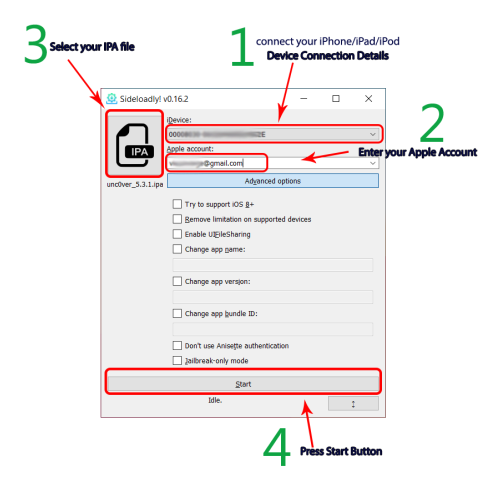
- Step#2: Connect your iPhone/iPad/iPod device to your computer
- Step#3: Enter your Apple account email
- Step#4 Press on the IPA button to select an IPA file, or Drag & drop it
- Step #5: Click on the Start button & Enter your Apple ID Password, then press OK.
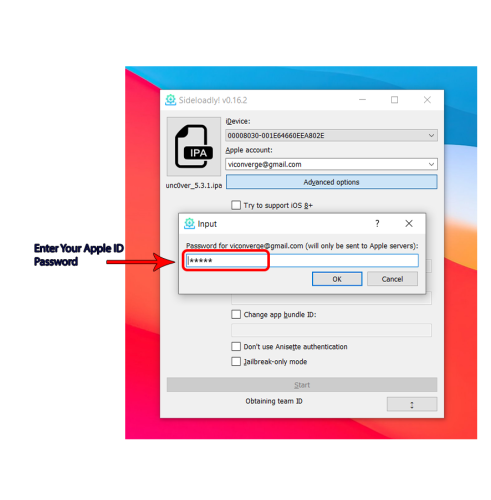
- Step#6 Tap OK Now you can see a verification code pop-up on your Device
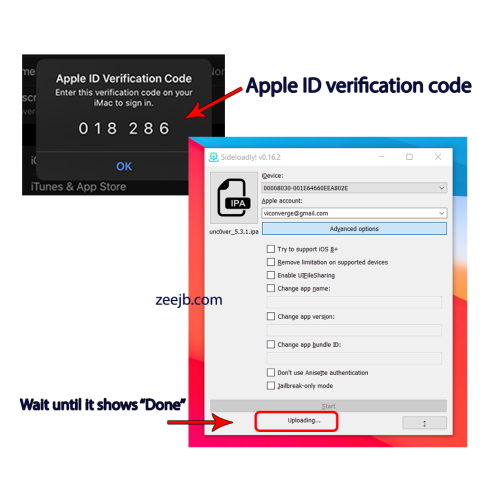
- Step#7 Enter the verification code and Tap on the Ok button.
- Step#8 Wait for the Done Message
- Step#9 Once show the done message, Go to the home screen on your device for the App.
- Step#10 Trust the App from Settings > General > Profile and Device Management and Trust the App.
How to use sideloadly via Wi-Fi
To enable Wi-Fi sideloading via Sideloadly, make sure your iDevice and PC are connected to the same network.
Step 1: First, connect your iPhone / iPad via a USB cable and set the following options on your OS.
Windows: Open iTunes > Connected Device > Summary > Options > Enable "Sync with this iDevice over Wi-Fi" option > Sync & Done.

Latest macOS: Finder > Select your iDevice under 'Locations' > General > Enable "Show this iDevice when on Wi-Fi" option > Sync & Done.

Older macOS: Open iTunes > Connected Device > Summary > Options > Enable "Sync with this iDevice over Wi-Fi" option > Sync & Done.
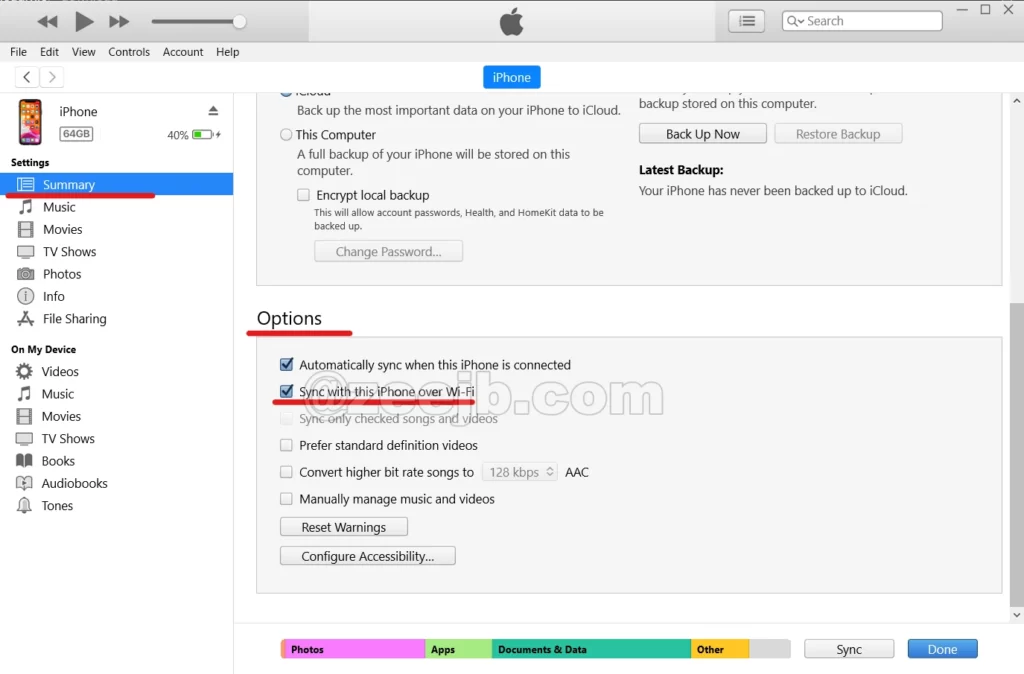
If you have not yet installed iTunes, you need to download and install the latest version of iTunes.
Step 02: Now you can remove your iPhone / iPad from the computer, and you can sideload the IPA application without connecting your iDevice to the computer. ( You can see the “@Wi-Fi” text near the device UDID – this means that your device is now connected via wifi)
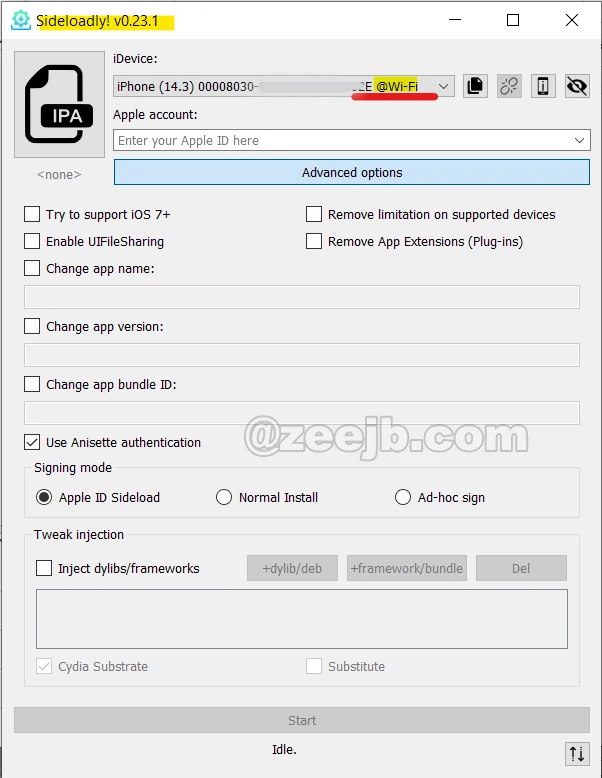
Be sure to unlock your iDevice and connect your device and computer to the same network.
Best alternatives to Sideloady
Alternatives
In this section, we have listed the best alternatives to Sideloady IPA Installer. Basically, there are two alternative categories: online (without a PC) and local (with a PC).
Online Alternatives
Normally, a computer is required to sideload IPA apps without revocation or app crashes. However, most iPhone users dislike it.
As a result, iOS security developers developed a new mechanism for sideloading IPA files online without a PC.
The E-sign patch is the most popular alternative tool for sideloadly. You can download and sign any IPA online through the E-sign patch. Also, this allows you to download/sign unlimited apps without any issues.
#1 U04S Application Store
U04S Team(unc0ver Jailbreak Online Install tool providers) released their updated application store to support all iPhones and iPads on all iOS versions, including iOS 14, iOS 14.1, iOS 14.2, iOS 14.3, and iOS 14.4. (The team hopes to develop the tool for Apple’s next updates like iOS 14.5, 14.6,… etc.)
With the Pro application, you can install 1000+ IPA files, games, tweaks, Jailbreak apps, and many more things.
Also, you can install the following favorite apps from U04S:
- unc0ver jailbreak
- unc0ver TV
- Kodi
- Apps
- iPOGO
- Mediabox
- Cheto PUBGM
- Pokémon GO
- Discord – Talk, Chat, Hang Out
- Clash of Clans
- Video Star
- Lensa Editor: Blur Background
- Netflix, and much more…
Download U04S Store
#2 Cripzi Jailbreak Repo Signer
Famous jailbreak developer @Dani Markowa released the Cripzi Repo signer, This tool is based on a partial jailbreak exploit. It used security bugs (iOS 14 and iOS 15.1) to access the root functions on the device.
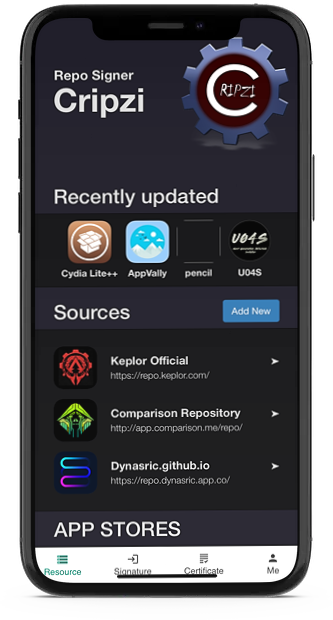
Cripzi Team officially tweeted that their tool was now supported with Apple’s newly released iOS 14.4 public version. Now it is compatible with iOS 14.5.
Also, you can install Cydia Lite, Favorite application stores, Hacked Games, Shortcut tweaks, and much more from Cripzi Pro.
Local alternatives(Need PC)
AltStore:
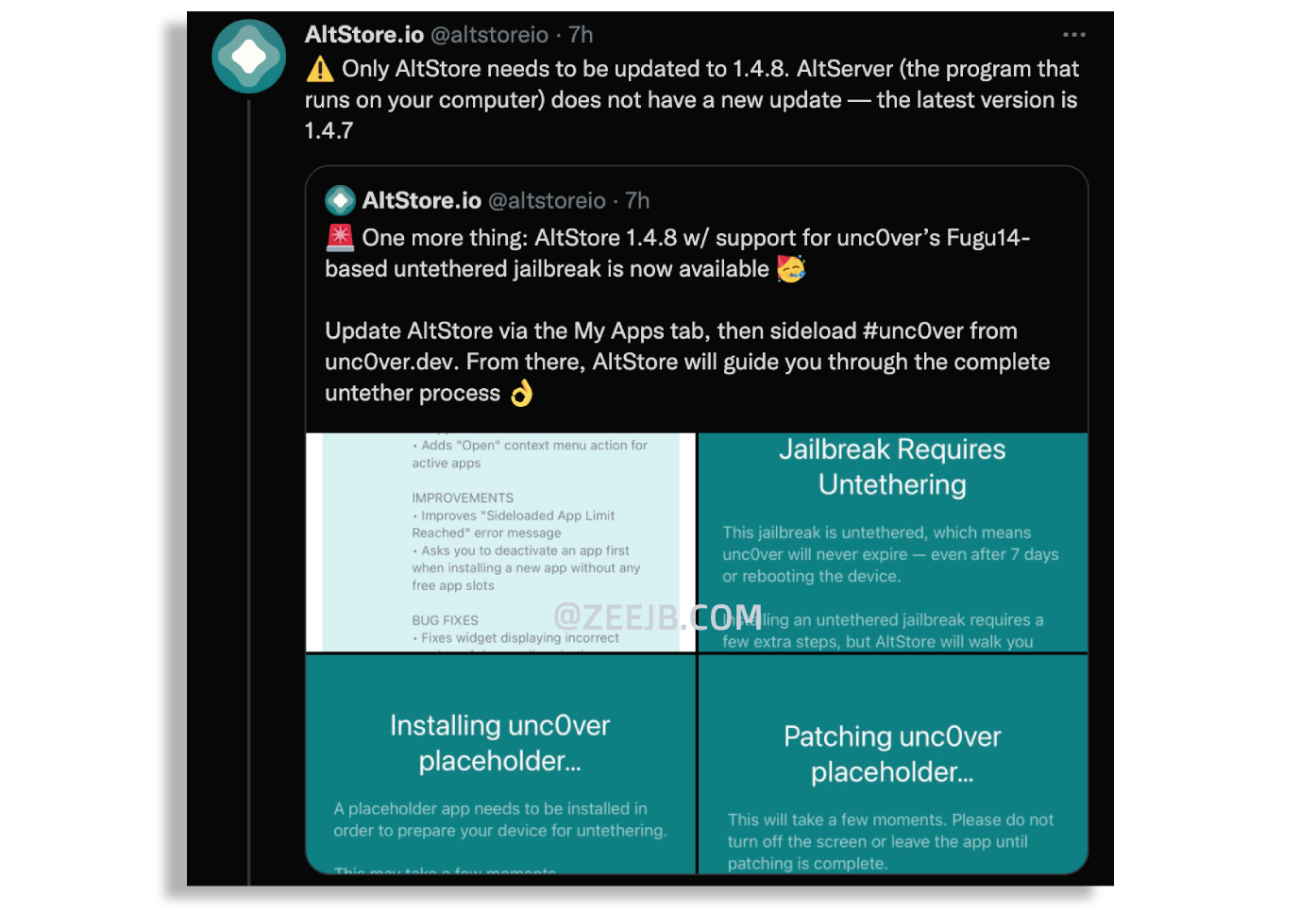
AltStore is an iOS app that lets you sideload other apps (.ipa files) onto your iOS device using your Apple ID.
AltStore resigns applications with your personal development certificate and delivers them to AltServer, a desktop program that installs the resigned apps via iTunes WiFi sync.
Features
- AltServer is used to install programs via WiFi.
- It uses your Apple ID to resign and install any program. Apps are refreshed in the background on a regular basis to keep them from expiring (when on the same WiFi as AltServer).
- App updates are handled directly via AltStore.
Features
- No Jailbreak is required.
- IPA Drag & Drop support
- Fixed the Application revoke issue
- Can sing with premium certificates(UDIDMaster)
- Apps Installation without jailbreak
- After the restart, the device application never crashed
- Windows OS compatibility
- Easy troubleshooting
- Drag & Drop. IPA Support
- iPA files Drag & Drop Support
- Ability to change app bundle ID.
- Ability to sideload apps with a free or paid Apple Developer account
- Dark & Light mode switch option
Sideload Supported Versions-
iOS 13, iOS 13.1.1 , iOS 13.1.2 , iOS 13.1.3 , iOS 13.2 , iOS 13.2.2 , iOS 13.2.3 , iOS 13.3 , iOS 13.3.1 , iOS 13.4 , 13.4.1 , iOS 13.5 , iOS 13.5.1 , iOS 13.5.5 Beta 1 , iOS 13.6 , iOS 13.6.1 , iOS 13.7, iOS 14.3, iOS 14.2, iOS 14.1, iOS 14.0.1, iOS 14, iOS 14.1, iOS 14.2, iOS 14.2, iOS 14.3, iOS 14.5, iOS 14.6, iOS 14.7, iOS 14.8, iOS 14.8.1
Also works on Apple’s Latest released iOS 15, iOS 15.1, iOS 15.2, iOS 15.3, iOS 15.3.1, iOS 15.4
Checkout our iOS 15 Jailbreak Guide
Supported Devices-
- Phone 13, iPhone 13 Mini, iPhone 13 Pro, iPhone 13 Pro Max,
- Phone 12, iPhone 12 Mini, iPhone 12 Pro, iPhone 12 Pro Max,
- iPhone 11, iPhone 11 Pro, iPhone 11 Pro Max,
- iPhone XS, iPhone XS Max, iPhone XR, iPhone X,
- iPhone 8, iPhone 8 Plus,
- iPhone 7, iPhone 7 Plus,
- iPhone 6s, iPhone 6s Plus,
- iPhone SE (1st gen), iPhone SE (2nd gen),
- iPod touch (7th gen), iPad Pro (4th gen),
- iPad Pro 11-inch (2nd gen), iPad Pro (3rd gen),
- iPad Pro (1st gen), iPad Pro (2nd gen),
- iPad (7th gen), iPad (6th gen), iPad (5th gen), iPad mini (5th gen),
- iPad mini 4, iPad Air (3rd gen), iPad Air 2
Advantages
- IPA Drag & Drop support
- Windows 32-bit and 64-bit compatibility
- No Need Jailbreak
- Cydia impactor alternative
Old Versions:
v.50.0
=>> Apple TV (tvOS) sideloading support is now available! You can now pair & sideload to your Apple TV using Sideloadly! tvOS sideloading has only been tested on macOS with an Apple TV 4K which seemingly has no way of pairing on Windows for now. It is possible that USB Apple TVs will work on Windows but we did not have any available to test. Depending on how popular this feature is, we may look into implementing better Windows support.
=>> Apple TV or TVOS automatic app refreshing is available. Patreon feature.
=>> Implemented support for enabling JIT on already running apps.
=>> Implemented support for UTF-16 encoded list files that may be declared as UTF-8. This means even more IPA files will be supported.
=>> Hiding sensitive information now also extends to the daemon.
=>> Improved the responsiveness when loading the JIT submenu.
=>> Fixed an issue with the dynamically updating macOS Mail Plug-In which was affecting certain Macs. – Fixed an issue that prevented sideloading on Apple Silicon Macs.
=>> Fixed an issue with JIT on macOS which would fail with error code -27.
=>> Added additional information for troubleshooting the update issue certain users are experiencing.
=>> Various minor improvements & bug fixes.
v0.40.4 update was released!
=>> Improved the communication between Sideloadly & the auto refresh daemon.
=>> Added Mail Plug-In support for macOS 13.3. We’re also working on further improving the Mail Plug-In.
=>> Further improved notifications by mentioning which device the app was refreshed for.
=>> Fixed an issue where Sideloadly would crash after setting a custom app icon.
=>> Fixed an issue where the installation would halt if Patreon pledge failed to be fetched.
=>> Fixed an issue where the daemon would try to inject a previous tweak into a new IPA.
=>> Fixed an issue where the daemon would not respect custom set bundle IDs.
=>> Fixed an issue that caused a “caching size mismatch” error.
=>> Fixed an issue which caused a “caching size mismatch” error.
=>> Various other minor bug fixes and improvements.
v 0.40.3 update was released!
=>> Better support for paid Apple IDs
=>> Many improvements were made to auto-refresh. Launch on startup, fewer notifications, & more!
v 0.40.2 bugfix update was released!
=>> Fixed incompatible macOS Mail Plug-In
=>> macOS Terminal no longer appears on launch
=>> Sideloadly Daemon now launches after the update
v 0.40.1 bugfix update was released!
==> Fixed a caching issue with auto refresh
==> Toned down the number of notifications from the daemon
==> Reduced auto refresh-related error messages
Sideloadly v0.20.4 released:
Fixed: iOS codesign errors
Bug fixed
v0.14
- Corrected an issue that prevented signing because the file was being utilized by another process.
- Retries are now only performed on LOCKDOWN E MUX ERROR failures.
- Corrected an empty error message that may have affected users.
- Resolved an issue with applications crashing when installed using the Jailbreak-only option.
- Resolved a MemoryError problem with large executables.
- Windows 32-bit support has been added.
- Removed/Cleaned up unneeded code, resulting in a smaller total bundle size.
v0.13
- Sideloadly now identifies devices without needing to restart when they are plugged in.
- Fixed an issue where changing the bundle ID on the latest versions of iOS would cause sideloading to fail
- Fixed charmap and encoding errors on some IPAs
- Fixed an issue where changing the bundle ID on the latest versions of iOS would cause sideloading to fail
- On LOCKDOWN E PASSWORD PROTECTED messages, Sideloadly will now wait until you unlock your device before proceeding with the installation
v0.12
- Added support for iOS 14 BETA 3+
- Fixed an error with provisioning profiles
- Fixed an issue that would prevent sideloading apps which special characters in their names
- Allow choosing team ID if there are several of them
- Workaround fix for LOCKDOWN_E_MUX_ERROR on large.IPA file
v0.11
- Added Jailbreak-only option to install IPAs onto your Jailbroken device without needing an Apple ID. AppSync is required from Cydia
- Added UIFileSharingEnabled option to allow users to access the sideloaded app’s (documents) data
- Added debugging data to troubleshoot the “insufficient data” issue some users are reporting
- Minor bug fixes and improvement
v0.10 –
- Added URI Schemes so now you can easily download and sideload an.IPA.
- Fixed an update loop issue
- Minor bug fixes and improvements
v0.9.2 –
Changelog:
- Detect iOS version and toggle bundle ID mangling if necessary
- Added debugging output in an attempt to fix the “device already registered” issue
- Fixes an issue that prevented people from opening Sideloadly after updating
- Small improvements and bug fixes
v0.8 – Initial release
Sideloadly Developers
AltStore – iOS 13 workaround & AltPlugin
@KevinIssaDev – UI idea
Check out jailbreak tools
You may also like:
AppCake iOS & Mac App Store for Free iOS 17 [REVIEW] 2023
Sideloadly [Download IPA files and Cydia]
Is Sideloadly better Than Altstore?
Sideloadly VS AltStore
Both software is developed to sideload IPA files without having a paid apple developer account. I’m personally like to sideload because of easy UI and less error. But also AltStore is a good software to sideload IPA files.
But Sideloadly needs a PC every time you will sideload the application, But AltStore doesn’t need a PC after installation